Complete Your Purchase
Install Capo and Redeem Your License
Thanks for purchasing Capo! Follow the instructions below to make sure you have the latest version installed on your Mac and to get your personalized license key.
Important! If you purchased Capo as a gift for someone else, please forward this website and the redemption code to the (lucky!) recipient.
First, Install Capo
- Download Capo for Mac by clicking here.
- Depending on your browser settings, you might have to double-click the .zip file to decompress it.
- Drag the Capo app icon from your Downloads folder into your Applications folder.
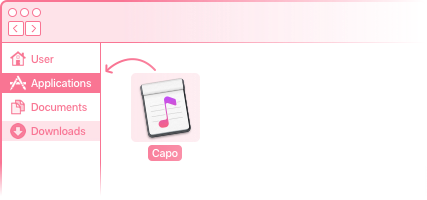
- Locate the Capo app icon in your Applications folder, and double-click to launch it.
Second, Get Your License Key
- From the main menu, choose Capo > License….
- Click the Redeem Code… button.
- Enter your name, e-mail address, and the redemption code you received with your purchase.
Note: Your name will be tied to the license key, and we need your email address to send you a copy of it for safe keeping. Read our privacy policy for further details.
- Click the Submit button to proceed.
And Now You're Done!
Upon completion, Capo displays your license certificate, and you should have an email with your license key in your inbox. If you have any questions, please contact support.