Learn More Songs in Less Time
Music players are built for listening. Capo is built for learning by ear. Slow down without losing quality, loop sections perfectly, restart from any note, detect chords instantly—everything you need to master songs is right there. Stop fighting your player. Start learning faster.
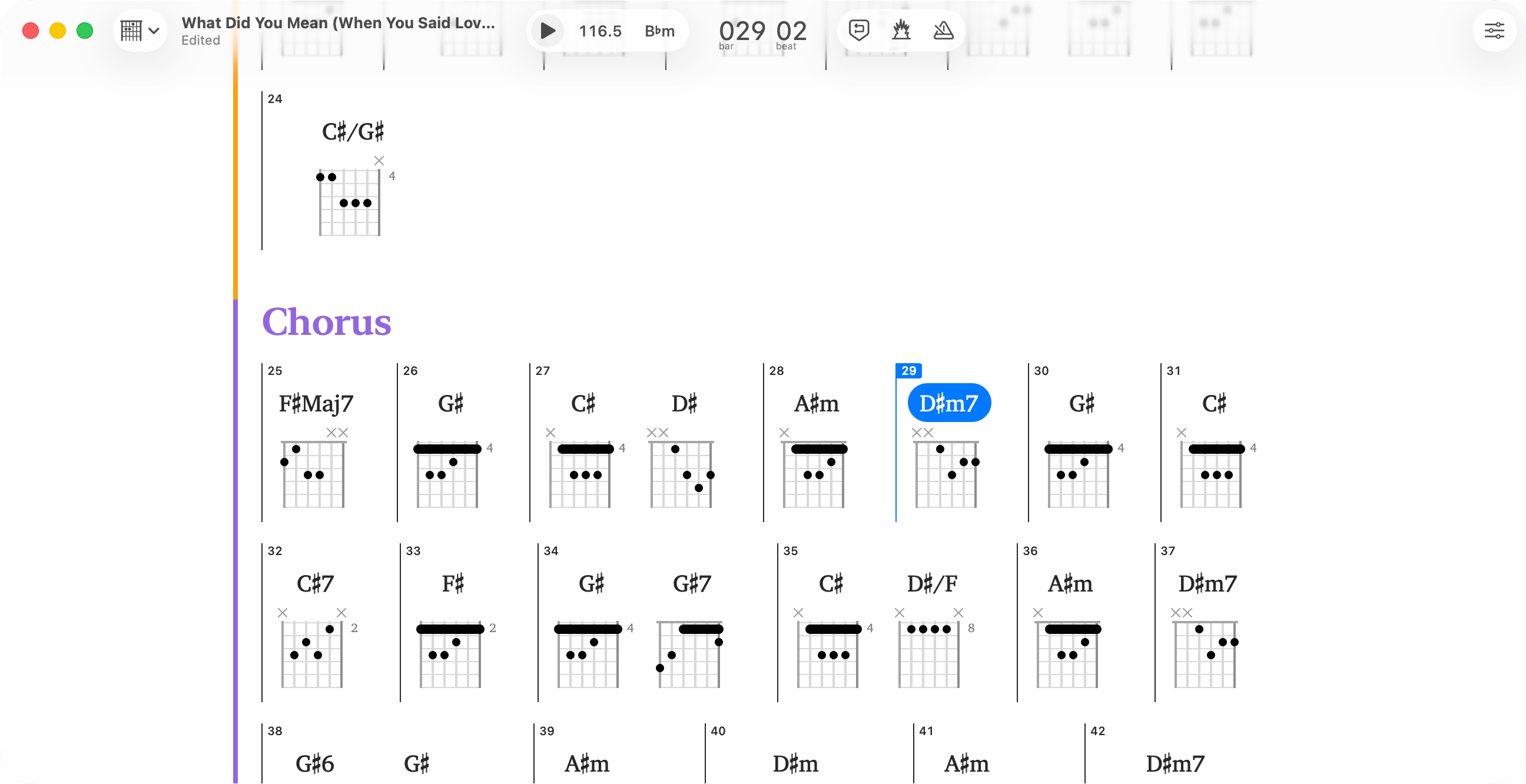
See Chords Detected in Seconds
Start playing immediately—no more guessing
Load any song and Capo identifies the chord progression throughout the entire track. Get accurate results in seconds instead of hours of trial-and-error. The detection gives you a head start while you develop your ear—you'll naturally recognize patterns as you play along.
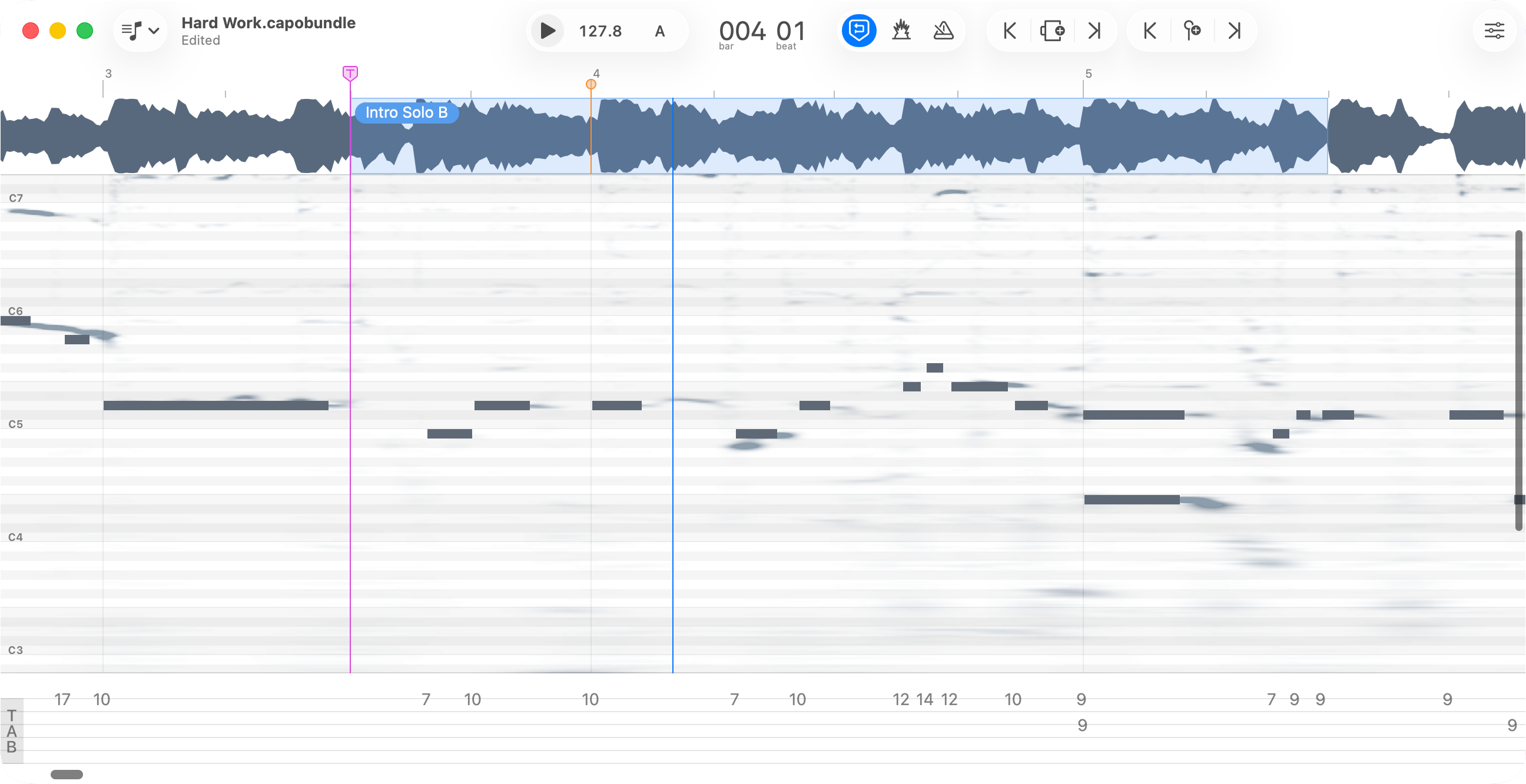
Hear It, Draw It, Confirm It
Identify notes by ear and verify what you heard
Carefully scrub through audio to hear individual notes clearly. Draw what you hear onto the spectrogram, and Capo plays it back so you can compare your interpretation with the recording. See bends, slides, and vibrato that help you capture the real technique—and as you draw, tablature is generated automatically below.
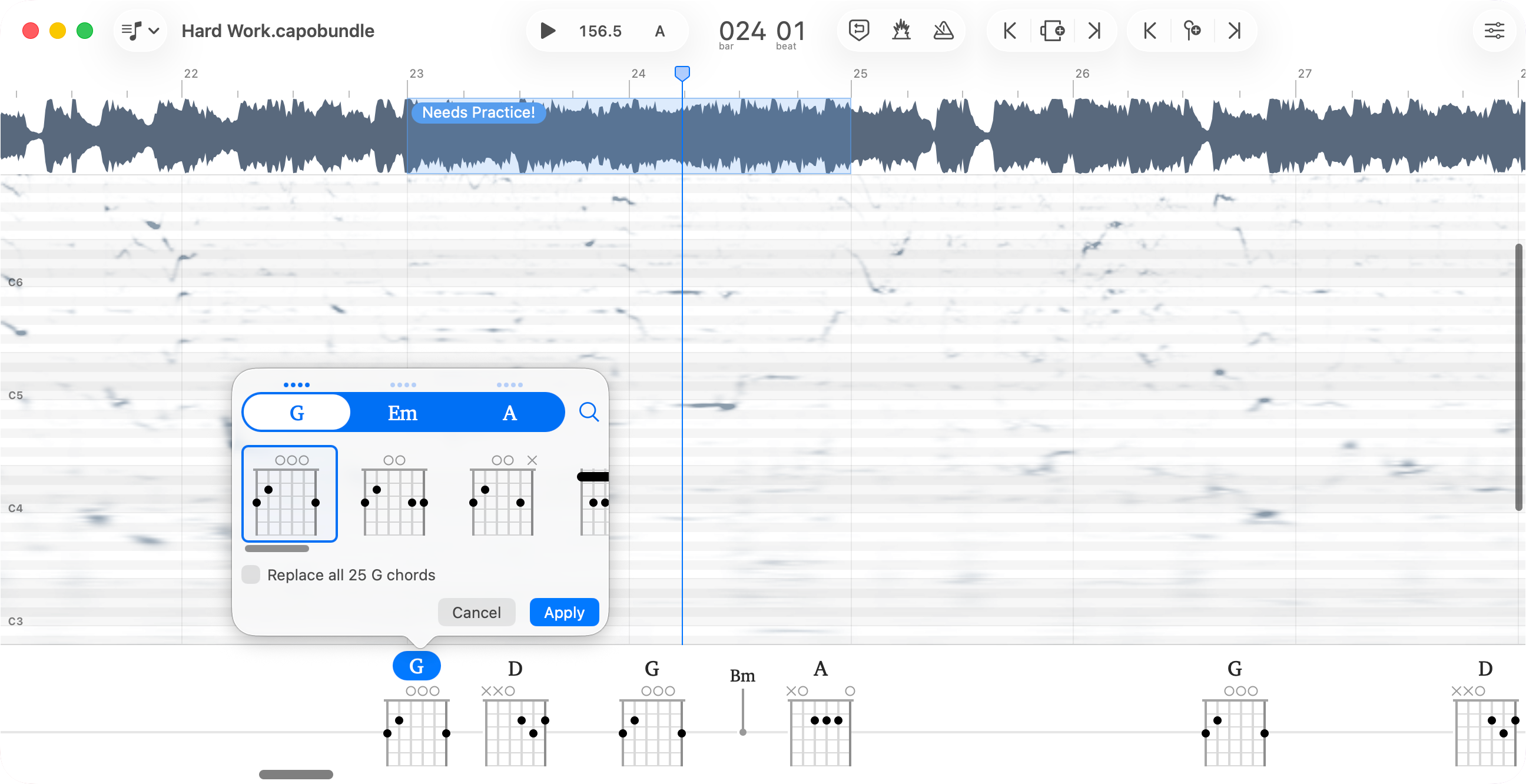
Refine Every Detail
The detection gets you 90% there—you finish the job
Capo's chord detection is accurate, but not perfect. Sometimes it's overly specific, sometimes not specific enough. Simplify a complex extension, add nuance that was missed, or choose a voicing that better fits your playing. Every chord is editable—the automatic detection saves you hours, then you fine-tune exactly what you need.
Everything You Need to Master Songs by Ear
Hear Notes More Clearly
Adjust playback from 25% to 150% speed without changing pitch, and freeze audio to isolate individual notes. When fast solos and complex passages fly by too quickly, slow them down to hear every detail at your own pace.
Play in Any Key
Transpose any song to a comfortable key and all chord diagrams update automatically. Match your vocal range, avoid awkward fingerings, or accommodate other instruments—without having to figure out the new chords yourself.
Loop in Time
Capo's beat detection automatically finds bars and beats, so you can create looping regions that snap perfectly to the measure. Practice challenging passages endlessly with beat-perfect loops—build muscle memory without awkward cuts or timing issues disrupting your flow.
Practice Without Interruption
Control playback, looping, and speed without touching your mouse or trackpad. Map MIDI pedals or keyboard shortcuts to keep your hands on your instrument while you practice—no more breaking your flow to reach for controls.
Work Note-by-Note
The transcription playhead stays exactly where you place it, letting you focus on one phrase at a time without fiddling with controls. Hit play, listen, stop—it always starts from the same spot. No hunting for your place, no losing your flow. Since you can only hold a few notes in working memory at once, this approach helps you master complex passages methodically instead of getting overwhelmed.
Four Views, Four Ways to Learn
Capo adapts to how you work. The Chords view displays your song as a chart—perfect for playing along. Switch to Tabbing for the spectrogram when you need to transcribe solos note-by-note. Use Structure view to see and navigate song sections at a glance. Or stay in Practice view for streamlined playback control. Each view gives you exactly what you need for that moment, nothing more.
Why Musicians Love Capo
Essential tool for musicians
★★★★★
Capo has replaced all of my older "slow downer" applications for audio. The visual interface lets me use the features - pitch, key, speed, etc. - quickly to work out songs and guitar breaks. I LOVE LOVE LOVE how it syncs between my Mac, iPad and iPhone. I can prepare a track on my Mac and use it when teaching on my iPad.
BradPDX - US
Capo for macOS
Great for practicing!
★★★★★
It's great for slowing down songs without losing much fidelity and learning the song by ear. I've been using it to take out hard riffs by ear with odd time signatures. Capo is definitely my go to. I love the loop feature and being able to zoom in on the wav file to get a precise loop going.
Zev001 - US
Capo for macOS
Excellent Resource
★★★★★
I use this app for learning songs daily. Very user friendly. I'm especially impressed when on the rare occasion there is a problem, the developer responds to my email with updates and fixes. V
KitMcQueen - US
Capo for macOS
Just what I needed
★★★★★
Capo has helped me so much. I've used it for learning guitar parts, practicing singing, and so many other things. It's a mainstay in my musical toolbox—thank you!
William Bernhard - US
Capo for macOS

Apple Design Award
Mac Developer Showcase
Winner 2011

Best of Mac App Store
Best Apps of the Year
2011

iMore Best of 2014 Award
Audio App of the Year
2014
“Whether I go to learn a song myself or teach someone how to play a song, I bring it up in Capo.”
Read about Capo's use in Education ›Capo is a fantastic way to analyze & learn music quickly; I love how clean the pitch algorithm is even at 1/4 speed. Capo is a great teaching & learning tool whether you're a rank beginner or a seasoned professional.
I have been wishing for this software for years. It's incredibly useful, whether I'm charting my own songs for the players who join me, or discovering exactly what is being played on a recording I love.
I am a devout Capo user for a couple of years now—it's the GREATEST of all, especially since it makes a library of your tunes you work on and is sonically great. It's my go-to music learning app!
Capo is an invaluable learning tool. I use it to loop hard phrases, and slow them down with very few artifacts, making them easy to master!

Vernon Reid
Guitarist for Living Colour

Kristian Bush
Guitarist/Singer for Sugarland

Will Lee
Bassist for David Letterman

Pete Thorn
Guitarist for Chris Cornell

The Complete Feature List
Hear Every Detail
Slow down to 25% speed without pitch change
Master blazing solos and complex passages at your own pace. Capo's professional time-stretching maintains perfect audio quality even at extreme slowdowns—no chipmunk effect, no artifacts.
Freeze and scrub through audio
Hold notes frozen in time as you drag through them. Isolate individual notes that fly by too fast, identify exactly what's being played, and hear subtle details impossible to catch at normal speed.
Solo or mute any instrument or vocal
Extract the guitar, bass, or vocal to hear it clearly in the mix, or eliminate it entirely to create a custom backing track. Powered by the advanced Neptune isolation engine.
Visual spectrogram shows every note
See what you hear. The spectrogram reveals notes, bends, slides, and vibrato visually—perfect for when your ears need help identifying fast or complex passages.
Start Playing Faster
Automatic chord detection in seconds
Load any song and see the complete chord progression instantly. Skip hours of trial-and-error and start playing immediately—the detection gives you a massive head start.
Edit and refine detected chords
The detection gets you 90% there—you finish the job. Simplify extensions, add nuance, or choose voicings that fit your playing. Every chord is editable and your changes save with the project.
Automatic key and tempo detection
Capo identifies the song's key and tempo instantly, giving you critical information without manual analysis.
Chord diagrams for any instrument
See fingerings for guitar, bass, ukulele, mandolin, banjo (4-6 strings), piano diagrams, or simple chord names. Switch between displays instantly. Lefties can flip to left-handed diagrams.
Practice Smarter
Looping regions with beat-perfect accuracy
Create regions that snap perfectly to measures and loop seamlessly. Practice challenging sections endlessly with perfect repetition—build muscle memory without timing issues disrupting your flow.
Adjust beat grid and tempo for complex songs
Correct downbeat locations and adjust beats per bar to match songs with tempo changes or unusual timing. Keeps metronome and looping regions perfectly in sync throughout the entire song.
Transcription playhead locks in place
Focus on one phrase at a time. The playhead stays exactly where you put it—hit play, listen, stop. Always starts from the same spot without hunting for your place.
Draw notes onto the spectrogram
Hear a note, draw it, play it back to verify your work. As you transcribe, tablature generates automatically below. No switching apps, no pen and paper—stay in the flow.
Hands-free MIDI and keyboard control
Map foot pedals or custom keyboard shortcuts to control playback, speed, and looping. Keep your hands on your instrument while you practice—no more breaking flow to reach for controls.
Song-synchronized metronome
Practice with a click track that stays locked to the song's tempo. Count-in feature gives you a bar or two to prepare before the music starts.
Play Comfortably
Transpose to any key instantly
Change the key to match your vocal range or avoid awkward fingerings. All chord diagrams update automatically—you don't have to figure out the new chords yourself.
Virtual capo for guitarists
Set a virtual capo position and all chord diagrams adjust to show fingerings relative to the capo. Audition songs in different positions to find what's most comfortable.
Support for alternate tunings
Configure custom tunings for guitar, bass, ukulele, banjo, and mandolin. Chord diagrams adapt to show accurate fingerings for your tuning.
Stay Organized
Label song sections (Intro, Verse, Chorus)
Organize complex songs into named sections. Jump between parts instantly to focus on what you need to learn, and see the big picture of how the song is structured.
Place markers at key moments
Mark specific notes, beats, or moments you want to return to. Perfect for flagging tricky spots or important transitions.
Projects save everything automatically
Your chord edits, loops, markers, speed/pitch adjustments, and playhead position all save as you work. Come back days later and pick up exactly where you left off.
Sync projects via iCloud
Work on your Mac, continue on iPad or iPhone. Projects stay up-to-date across all your devices running Capo.
Share projects with bandmates
Collaborate by sharing projects via AirDrop, Messages, email, or file transfer. Your chord charts, loops, and notes travel with the project.
Flexible Views & Interface
Four song views for different tasks
Chords view for playing along, Tabbing view for transcribing with spectrogram, Structure view to see sections, Practice view for streamlined playback. Each shows exactly what you need for that moment.
Toggle visibility of chords and tabs
Hide elements you don't need. Perfect for focused listening or when screen space is tight.
Full screen mode
Maximize your workspace by going full screen—great for focusing during practice sessions or when using Capo on stage.
Import & Export
Load from your Music library, and files
Works with DRM-free iTunes purchases, MP3, AIFF, WAV, M4A, FLAC, and MP4 audio files. Cannot load DRM-protected Apple Music streams.
Export audio with adjustments applied
Save your slowed-down, transposed, or isolated audio as M4A or AIFF files. Perfect for creating practice tracks or sharing arrangements.
Export MIDI files with chords and notes
Export audio-synchronized MIDI containing your chord and note entries. Use in DAWs or other music software.


Capo requires macOS 14 Sonoma or later
Capo uses ZTX PRO Time Stretch/Pitch Shift Technology licensed from Zynaptiq GmbH.